Meijer · Enterprise systems
Modernizing product hierarchy operations
I redesigned a transaction-driven mainframe workflow into a searchable, auditable enterprise experience while preserving the business rules expert users relied on.
- Role
- Senior UX Designer, experience design lead, in partnership with business analysts, product and engineering
- Platform
- Enterprise responsive web application
- Focus
- Legacy modernization, data management and accessibility
- Scope
- Approximately 13 connected hierarchy modules
Interface recreated for portfolio presentation to protect confidential product information. Record values shown are illustrative.
Corp Table
Corp Table manages enterprise product hierarchy, maintenance, allocations, and inventory configurations.
Recent updates
View audit log| Area | Updated by | Timestamp | Change summary | Status |
|---|---|---|---|---|
| Merchandise Area | Evelyn Hayes | Mar 03, 2025 09:42 | Updated freight % for MA: C | Completed |
| Department | Theodore Vance | Feb 22, 2025 14:08 | Created department DPT 5520 | Completed |
| Mass Upload | Arabella Mueller | Jan 11, 2025 11:17 | store_keys_bulk.xlsx import | Failed |
| MPRS | Kobe Harrell | Apr 04, 2025 08:55 | Reject reprocessing, batch 0042 | Pending |
| Allocations | Zackary Nixon | Sep 09, 2025 16:30 | Modified allocation rule for DPT 1240 | Completed |
| Merchandise Area | Brigitte Jast | Oct 10, 2025 10:01 | Created Merchandise Area I | Pending |
01
Project snapshot
What Corp Table manages
Product-hierarchy reference data: merchandise areas, departments, primary keys, sales keys, store overrides, MPRS and product categories, alternate hierarchy and freight exceptions. Almost every downstream merchandising, finance and warehouse process reads these values.
Who uses it
Experienced internal users. Business and merchandise teams look up known keys, maintenance users correct mappings, administrators manage controlled reference data, and a large group has inquiry-only access.
Why it matters
A single wrong freight percentage or an inactivated parent record ripples into cost, allocation and store operations. Speed matters, but so does being able to prove what changed and who changed it.
What made it complex
Nine record types plus cross-level list views, three modes per module, store-level overrides, security gating on maintain, and business terminology that engineering, finance and merchandising each read slightly differently.
My role
I led the experience design: facilitating working sessions, turning mainframe behavior into written requirements, designing the shell and every module pattern, and documenting states for engineering. Business analysts owned rule confirmation; engineering owned the data layer.
Constraints
Business rules could not change. Terminology used by business teams had to survive. Some rules were undocumented and only visible in mainframe behavior, so the work included flagging what still required confirmation.
02
The system that already worked
Corp Table lives inside a 3270 mainframe application reached from the CICS application menu. Every task is a typed selection, and every action is a function key. Expert users were genuinely fast in it, the redesign had to earn its keep against that speed.
Corp Table is reached as option 3, CORPTABL, from the CICS application list. Users memorize the number.
Seven two-letter selections: PH Product Hierarchy, MM MPRS Maintenance, IT I.T.S. Functions, DA Dept. Allocations, BW Buyer Worksheet, PI Physical Inventory, CK Cost Key Inventory.
Two typed inputs, selection and function. Selections MA, DP, PK, SP, SK, SS, MP, PC, SR plus list views MD, PM, PS and AH. Functions I, M, L. Footer states security is required for (M) Maintain.
Code, description, status, import and non-import maximum freight % and $, default freight %, vendor receipt tolerance min/max % and limit $, Meijer average cost % change, net item cost max amount change.
The same data as a dense multi-row grid, split across two stacked blocks because the values do not fit one 3270 screen.
Department number and description, parent merchandise area code and description, status. PF3 is the only action.
Primary key and description with import and non-import maximum freight % / $, minimum freight %, cost-change limits, and a NEXT KEY field for paging one record at a time.
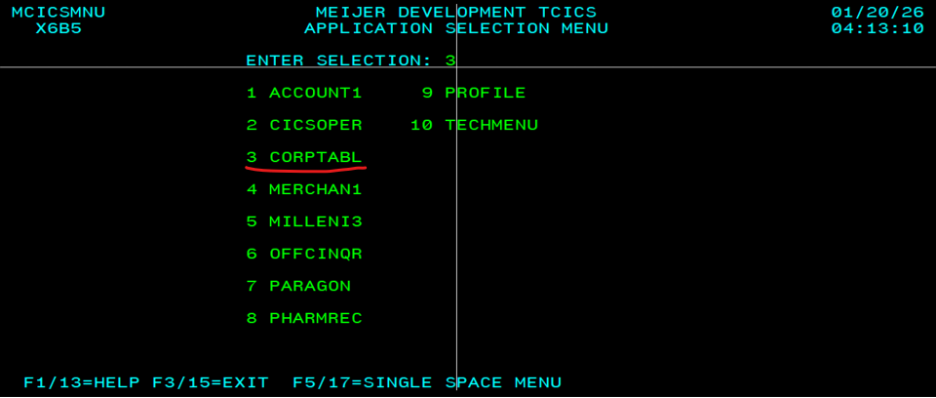
Corp Table is option 3, CORPTABL, in the CICS application list.
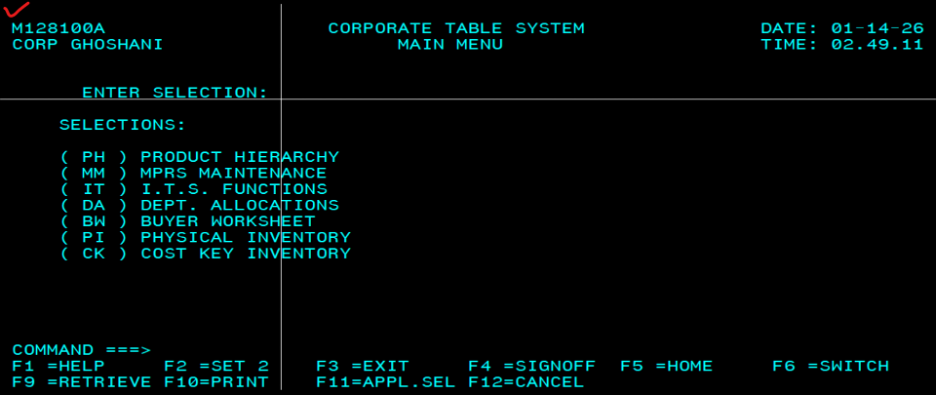
Seven two-letter selections typed into a single command field.
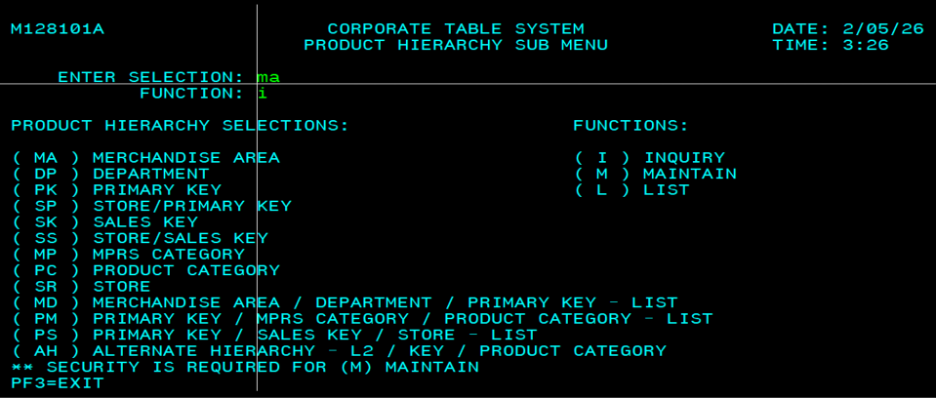
Thirteen selections and three functions, inquiry, maintain, list.
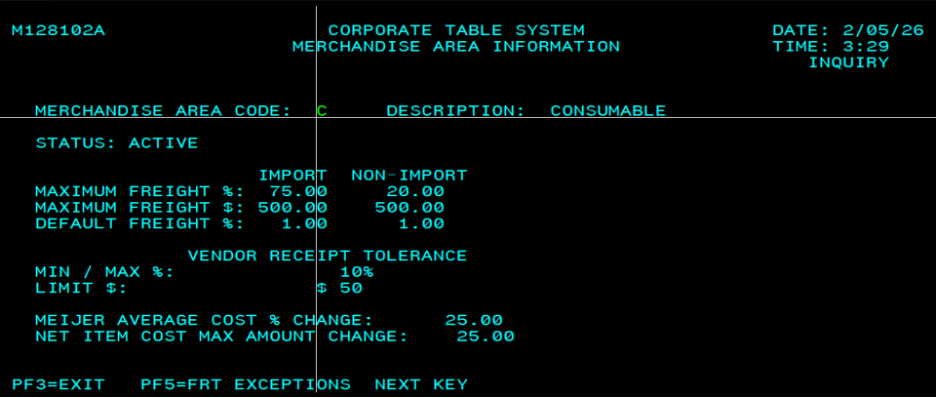
Freight limits, tolerances and cost-change caps for one area.
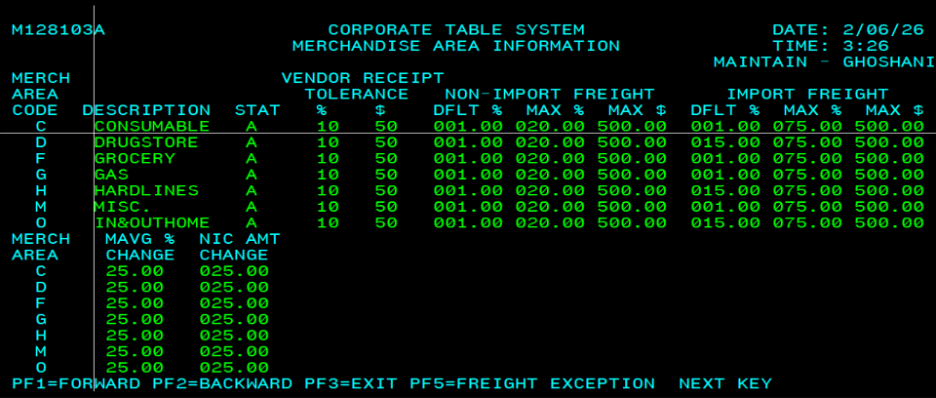
One record split across two stacked blocks to fit the 3270 screen.
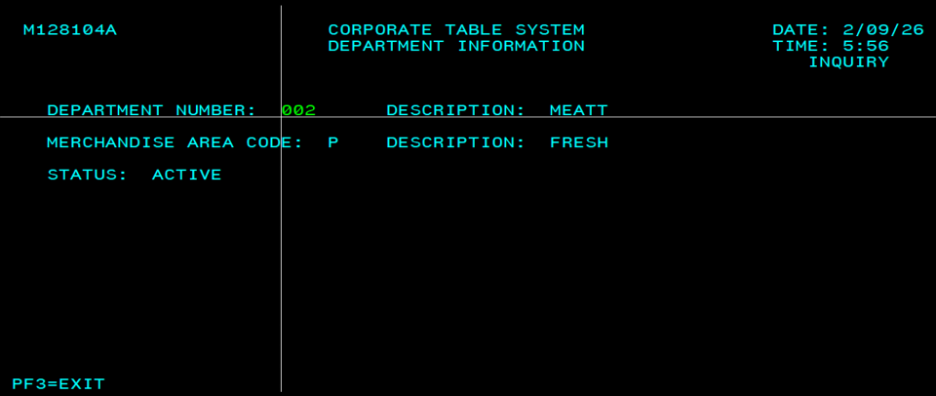
Department, parent merchandise area and status. PF3 is the only action.
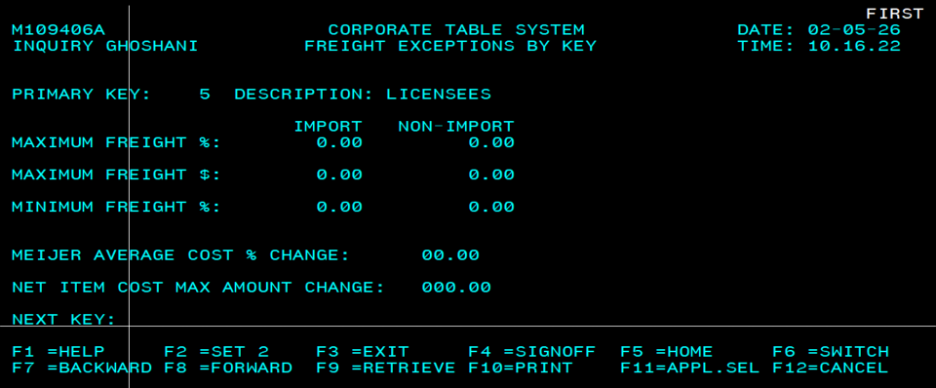
NEXT KEY pages one primary key at a time.
Function keys and their replacements
| Key | Legacy behavior | Modern equivalent |
|---|---|---|
| F1 / PF1 | Help, and Forward on the maintain grid | Contextual help link in the page header; pagination controls on tables |
| F2 / PF2 | Set 2, and Backward on the maintain grid | Column selector for the second set of fields; pagination controls |
| F3 | Exit the current screen | Breadcrumb and a labeled Back to results action |
| F4 | Signoff | Account menu → Sign out |
| F5 | Home, and Freight Exceptions from merchandise area screens | Corp Table home in global nav; a Freight exceptions action inside the record it belongs to |
| F6 | Switch application | Application switcher in the global header |
| F7 / F8 | Backward and forward through records | Previous and next paging with a visible result count |
| F9 | Retrieve the previous command | Recent searches on the find-a-record screen |
| F10 | Export records sheet with column and permission summary | |
| F11 | Return to application selection | Meijer application switcher |
| F12 | Cancel | Cancel and Discard changes, with an unsaved-changes dialog |
| NEXT KEY | Typed field to jump straight to another record | Persistent known-key search kept in the page header |
03
Thirteen modules, one hierarchy
The product hierarchy sub menu holds thirteen selections. In the terminal each one is a two-letter code paired with a function letter. In the redesign each is a named module that states what it holds and what your role can do with it.
Merchandise Area
MATop-level areas with freight and cost-change limits
Department
DPDepartments mapped to a merchandise area
Primary Key
PKPrimary keys and their freight exceptions
Store / Primary Key
SPStore-level overrides on primary keys
Sales Key
SKSales key reference values
Store / Sales Key
SSStore-level sales key overrides
MPRS Category
MPMPRS categorization values
Product Category
PCProduct categories under MPRS
Store
SRStore reference records
Area / Dept / Key, list
MDCross-level list view
Key / MPRS / Category, list
PMCross-level list view
Key / Sales Key / Store, list
PSCross-level list view
Alternate Hierarchy
AHL2 / key / product category
04
What was preserved, simplified and retired
The hardest part of this project was separating real business rules from terminal limitations. They look identical until you ask why the screen behaves that way.
Legacy limitation: Three memorized hops before any work begins.
Modern approach: Product Hierarchy → module → mode, always visible in breadcrumbs.
Why: The hierarchy of choices is real. Only the memorization was removed.
Legacy limitation: Mode is a typed letter; users can enter maintain by accident.
Modern approach: Inquiry, Maintain and List as a labeled mode selector on the module, with Maintain disabled and explained when the user lacks security.
Why: Modes are genuinely different tasks with different permissions.
Legacy limitation: A footnote; the failure only appears after the attempt.
Modern approach: Permission is shown on the module card and on the record, before the action is attempted.
Why: The rule is unchanged; only the moment it becomes visible moved earlier.
Legacy limitation: A hidden key jump; the originating record is not carried on screen.
Modern approach: Freight exceptions opens from the record it belongs to and keeps the primary key in context.
Why: Same destination, visible entry point, no lost context.
Legacy limitation: One record at a time, no result set, no idea how many exist.
Modern approach: Known-key search plus a semantic results table with an announced count.
Why: Experts still type a key and press Enter, they just also get context.
Legacy limitation: Fields split across blocks because of the 80-column limit.
Modern approach: One table with a column selector and horizontal scroll retained under sticky headers.
Why: The split existed only because of the terminal, not because of a business rule.
Legacy limitation: No before-and-after view of what is about to change.
Modern approach: Review changes screen with field, previous value and new value, then Save.
Why: Business users asked for exact before-and-after values.
Legacy limitation: Generic, terminal-oriented, sometimes clears the entry.
Modern approach: Error summary linked to each field, entered values preserved, plain-language recovery.
Why: Requires business confirmation for the full legacy message catalog.
Legacy limitation: Printing a screen was the only way to take data away.
Modern approach: Export records sheet listing filters, record count, included columns and excluded restricted fields.
Why: Screen printing was a workaround for a missing export.
05
Before and after
Drag the handle to wipe between the original mainframe screen and the redesigned equivalent. The screens on the left are the real Corp Table terminal; the right side is the recreated interface built on the Meijer design tokens.
Corp Table
Corp Table manages enterprise product hierarchy, maintenance, allocations, and inventory configurations.
Recent updates
View audit log| Area | Updated by | Timestamp | Change summary | Status |
|---|---|---|---|---|
| Merchandise Area | Evelyn Hayes | Mar 03, 2025 09:42 | Updated freight % for MA: C | Completed |
| Department | Theodore Vance | Feb 22, 2025 14:08 | Created department DPT 5520 | Completed |
| Mass Upload | Arabella Mueller | Jan 11, 2025 11:17 | store_keys_bulk.xlsx import | Failed |
| MPRS | Kobe Harrell | Apr 04, 2025 08:55 | Reject reprocessing, batch 0042 | Pending |
| Allocations | Zackary Nixon | Sep 09, 2025 16:30 | Modified allocation rule for DPT 1240 | Completed |
| Merchandise Area | Brigitte Jast | Oct 10, 2025 10:01 | Created Merchandise Area I | Pending |
A typed two-letter selection becomes a searchable home with the modules on screen.
06
The challenge
How might we make product-hierarchy maintenance easier to understand without removing the speed, precision and business rules experienced users depend on?
Hierarchy levels
Merchandise Area → Department → Primary Key → Store / Primary Key, with Sales Key, Store / Sales Key, MPRS Category, Product Category and Alternate Hierarchy connected across levels.
Modes
Inquiry, Maintain and List for applicable modules, connected instead of presented as separate products.
Permissions
Inquiry, maintenance, administrator and view-only. Maintain is security-gated exactly as the mainframe stated.
Store overrides
Store-level values sit on top of hierarchy defaults, which is where most troubleshooting starts.
Freight exceptions
A primary-key workflow reached today by a hidden PF key.
History and export
Quick recent changes for triage, full audit table for investigation, export for downstream work.
07
How I learned the system
Mainframe review
Walked every supplied screen and recorded screen IDs, field names, PF-key actions and message lines.
Working sessions
UI and UX sessions with business stakeholders to confirm what each field means and which rules cannot move.
Mode clarification
Confirmed how Inquiry, Maintain and List actually differ, and that maintain is security-gated.
Table versus card
Discussed presentation directly with the business. Tables won because the work is comparison-heavy.
Open questions
The complete legacy validation-message catalog, and several derived freight rules, remain marked Requires business confirmation.
Handoff
Documented interaction, validation and permission behavior for engineering, and supported implementation questions.
What I heard, and what I did
Users often begin with a known primary key.
→ Use a focused numeric lookup instead of forcing users through a large dropdown.
Recent changes are needed for rapid troubleshooting.
→ Provide a quick history sheet with a path to the complete audit table.
Business users need exact before-and-after values.
→ Show field-level comparisons in review and history.
Inquiry and maintenance permissions differ.
→ Adapt available controls to the user's role instead of showing disabled buttons everywhere.
Experts had learned the mainframe's shortcuts and did not want them taken away.
→ Keep Enter-to-search, keyboard paging and direct key entry; add labels rather than steps.
08
Design principles
Preserve expert speed
Type a key, press Enter, land on the record.
Make hierarchy relationships visible
Every record shows its parent and children as links.
Prevent errors before save
Validate inline, review before commit, detect duplicates.
Show permission and status clearly
Role and record status are visible before an action is attempted.
Keep changes traceable
Field-level history with previous and new values.
Scale through reusable patterns
One module pattern serves all thirteen.
09
The redesigned experience
The live Corp Table application shown at the top of this case study lets you navigate the hierarchy from the sidebar, open a module, search a known key, open a record, edit it, review the before-and-after values and save. Values are illustrative.
10
Anatomy of the data table
- Sticky header with clear column labels and stable widths
- Sort indicators with a text alternative, not arrows alone
- Filter summary chips that can be removed individually
- Right alignment for percentages and amounts
- Status as a label plus icon, never color alone
- Truncation only where the full value can still be read
- Announced result count and rows-per-page control
- Full keyboard navigation with a visible focus ring
- Responsive column reduction with a column selector on tablet
11
Error and edge-case inventory
Required field missing
Error summary above the form, focus moved to it, each message links to its field.
Invalid identifier format
Explains the expected format with an example; entry is preserved.
Duplicate record
Names the existing record, links to it, keeps the form intact.
Invalid hierarchy relationship
Explains which parent the value conflicts with.
Inactive parent record
Blocks the save and offers the parent record for review.
Invalid effective date
States the permitted range in plain language.
Restricted action / permission failure
Explains the restriction and offers Request access.
Record changed by another user
"This record changed after you opened it." with Review latest version, Compare changes, Cancel my changes.
Save failure
Keeps entered values and offers Try again.
System unavailable / connection loss
Non-destructive banner; the form stays editable.
No results
Repeats the search terms and offers to widen to a contains match.
Export failure
Explains the failure and keeps the filter set.
Session timeout
Warns before expiry and returns the user to the same record after sign-in.
Loading and empty history
Skeleton rows for initial load; an explanatory empty state for records with no changes.
12
Permission model
| Role | Can | Cannot |
|---|---|---|
| Inquiry user | Search, view records, view relationships, view recent changes. | Edit, add, inactivate, export restricted fields. |
| Maintenance user | Everything inquiry can do, plus edit, add, review and save changes. | Manage controlled reference lists. |
| Administrator | Maintain, manage controlled values, review full audit history, export. | - |
| View-only user | Search, review, view permitted history and export permitted data. | See enabled editing controls anywhere in the product. |
13
Accessibility (WCAG 2.2 AA)
- Semantic tables with captions, scope on headers and programmatic sort state
- Error summary receives focus; each message links to its field
- Save and export results announced through a live region without moving focus
- Status communicated by label and icon as well as color
- Visible focus that is never hidden behind sticky headers or side sheets
- Skip to main content, logical tab order, no hover-only information
- Reflow at 200% zoom, essential reflow at 400%, text wrapping preserved
- Reduced Motion and Increased Contrast supported; transitions 150–220ms
14
What engineering received
- Component behavior with default, hover, pressed, focus, selected, disabled, loading, error and read-only states
- Field rules: type, length, required, controlled values, read-only system fields
- Permission rules per module and per action
- Validation order and message text for every inventoried error
- Loading, empty and offline states for each surface
- Audit requirements: which fields are recorded, and the previous/new value pairing
- Responsive behavior at 1440, 1280, 1024, 768 and narrow widths
- Accessibility annotations and acceptance criteria per screen
15
Outcomes
One consistent pattern now serves every hierarchy module instead of a screen per transaction.
Visible, labeled actions replaced hidden PF-key commands.
Review-before-save protects every maintenance change.
Role-based actions replaced a footnote about security.
Field-level audit visibility is available from both a quick sheet and a full table.
Reusable specifications and states were delivered to engineering.
Fewer mis-keyed maintenance changes reaching production.
Faster troubleshooting when a store value looks wrong.
Shorter onboarding for users who never learned the transaction codes.
Honest limitations
- The full legacy validation-message catalog was not supplied; those messages are marked Requires business confirmation.
- No formal usability testing was run, so no task-time or error-rate metrics are claimed.
- Values shown in the prototype are illustrative and contain no confidential Meijer data.
16
Reflection
What was most difficult
Separating rules from terminal limitations. A split screen and a business rule can look identical until you ask why.
The tradeoff that took the most judgment
How much of the typed, keyboard-first speed to keep. I kept Enter-to-search and direct key entry, and added labels rather than steps.
What expert users taught me
They were not fighting the mainframe. They were fast in it. The redesign had to earn its keep against people who were already efficient.
What I would test next
Time to correct a wrong store override, and whether the review step is read or skipped.
How it scales
Each new module is a configuration of the same shell, search, table, record, review and audit pattern.